Overview
CLI Commands
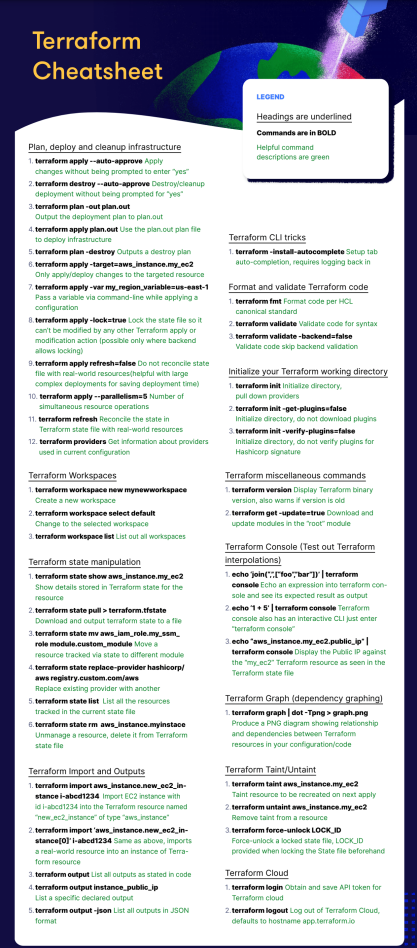
Terraform is driven entirely from the command line. Here's a reference of the most common commands and flags.
Core Workflow
| Command | Description | When to Use |
|---|---|---|
terraform init |
Initializes the working directory. Downloads providers and modules. Always run this first or after adding new providers/modules. | First thing you run in a new or freshly-cloned project, and again any time you add or change a provider or module. |
terraform plan |
Previews what Terraform will do without making any changes. Get in the habit of always reading this carefully. | Before every apply, to sanity-check what's about to change. Also useful on its own just to check for drift. |
terraform apply |
Applies the changes described in the plan. Will prompt for confirmation unless you pass -auto-approve (use that flag carefully). |
Once you've reviewed the plan and you're ready to actually create, update, or remove infrastructure. |
terraform destroy |
Destroys all managed infrastructure. Essentially runs a plan in reverse. | Tearing down a temporary environment (a demo, a test stack) or fully decommissioning something for good. |
Tip: Never run
applyordestroyin production without first reviewingplanoutput. Terraform will tell you exactly how many resources will be added, changed, or destroyed. Treat that number as a sanity check.
Useful Flags
| Command | Description | When to Use |
|---|---|---|
terraform version |
Prints the installed Terraform version. Useful when debugging environment issues. | Something behaves unexpectedly and you want to rule out a version mismatch between your machine and CI, or against a module's required version. |
terraform -chdir=<path> |
Runs a subcommand as if you were in <path>. Useful for scripting or running Terraform outside the working directory. |
Writing a script or wrapper that runs Terraform against a directory you're not currently sitting in. |
terraform plan -out <plan_name> |
Saves the plan to a file. Use with terraform apply <plan_name> to guarantee exactly what was reviewed gets applied, no surprises between plan and apply. |
Any CI/CD pipeline or team workflow where a human (or a gate) reviews the plan before it's applied. |
terraform plan -destroy |
Generates a preview of what destroy would do, without destroying anything. |
You want to double-check exactly what would be torn down before actually running destroy. |
terraform apply <plan_name> |
Applies a previously saved plan file. | Right after terraform plan -out, to apply exactly what was reviewed. |
terraform apply -target=<resource> |
Only applies changes to a specific resource. Useful for surgical fixes, but avoid making it a habit it can leave your state out of sync with your config. | A one-off emergency fix to a single resource, not as a regular part of your workflow. |
terraform apply -var my_variable=<value> |
Passes a variable at runtime via the command line. | Quick, one-off overrides, testing a different value without editing a .tfvars file. |
terraform providers |
Lists all providers used in the current configuration. | Auditing what a configuration depends on, especially in an unfamiliar or inherited codebase. |
Core Concepts
Configuration Language
Terraform uses HCL (HashiCorp Configuration Language). Its main purpose is to declare the desired state of your infrastructure, not to write imperative scripts. Terraform figures out how to get there.
- Blocks — Containers for configuration objects (e.g.,
resource,variable,output). They have a type, optional labels, and a body. - Arguments — Key-value pairs inside a block that assign a value to a name (e.g.,
location = "eastus"). - Expressions — Anything that produces a value. This includes literals (
"hello"), references (var.name), and function calls (length(var.list)). - Identifiers — Names for things like arguments, block types, resources, and variables. Must start with a letter or underscore, and can contain letters, digits, underscores, and dashes.
Comments
Tip: Use
#for inline comments. It's the idiomatic Terraform style. Save/* */for temporarily commenting out large blocks during debugging.
Modules
A module is a collection of .tf and/or .tf.json files in a single directory. Every Terraform configuration is technically a module, the one you run commands from is called the root module.
Key rules:
- A module consists of only the top-level .tf files in a directory.
- Nested directories are separate modules and are not automatically included, you have to explicitly call them with a module block.
- Modules are how you reuse and organize Terraform code. Think of them like functions, they take inputs (variables), do work, and return outputs.
Tip: Don't let your root module become a dumping ground. As your config grows, break it into modules by concern (networking, compute, storage). This makes it easier to test, reuse, and reason about.
Resources
Resource blocks are the core of Terraform. They describe infrastructure objects (virtual networks, compute instances, DNS records, storage buckets, etc.)
The structure is: resource "<provider_type>" "<local_name>" { ... }
<provider_type>— The resource type defined by a provider (e.g.,azurerm_resource_group,aws_instance).<local_name>— A name you choose to reference this resource elsewhere in your config.
Providers
Providers are plugins that allow Terraform to interact with external APIs (Azure, AWS, GCP, Kubernetes, GitHub, etc.) Each provider exposes a set of resource types and their available arguments. Always check the provider's documentation; it defines exactly what arguments each resource accepts and which are required vs. optional.
Tip: Pin your provider versions in a
required_providersblock. Unpinned providers can introduce breaking changes when a new version is released.
Meta-Arguments
Meta-arguments are special arguments you can use on any resource type to change its behavior. They are not provider-specific.
| Meta-Argument | Description |
|---|---|
depends_on |
Explicitly declares a dependency Terraform can't automatically detect. Use sparingly, if you need it often, it may signal a design problem. |
count |
Creates N instances of a resource. Access them via resource_type.name[index]. |
for_each |
Creates instances from a map or set of strings. More flexible than count, prefer it when instances have different configurations. |
provider |
Selects a non-default provider configuration. Useful when working with multiple regions or accounts. |
lifecycle |
Customizes resource lifecycle behavior (e.g., create_before_destroy, prevent_destroy, ignore_changes). |
provisioner / connection |
Runs scripts or commands after a resource is created. Use as a last resort. Terraform is declarative, and provisioners introduce imperative, hard-to-debug behavior. |
Tip on
countvsfor_each: Usecountwhen instances are identical. Usefor_eachwhen each instance has unique attributes.for_eachis more robust, deleting a middle item in acountlist causes everything after it to be recreated, which can be destructive.
Timeouts
Some resource blocks support a nested timeouts block that lets you customize how long Terraform waits before failing an operation:
State
Terraform tracks all managed resources and their current real-world values in a state file (terraform.tfstate).
- The state is how Terraform knows what exists, what needs to change, and what to destroy.
- By default the state is stored locally, but in any team or production environment you should use remote state (e.g., Azure Blob Storage, AWS S3 + DynamoDB) so it's shared and locked.
- Never manually edit the state file. Use
terraform statecommands if you need to manipulate it.
Tip: Add
terraform.tfstateandterraform.tfstate.backupto your.gitignore. State files can contain sensitive values like passwords and keys in plaintext.
See State Management for a deeper dive into remote backends, locking, and recovering from drift.
Variables
Variables make your configurations reusable and avoid hardcoding values.
Base Types
| Type | Example |
|---|---|
string |
"East US" |
number |
3 |
bool |
true |
Complex Types
| Type | Description |
|---|---|
list |
Ordered sequence of values, same type. |
set |
Like a list but unordered and no duplicates. |
map |
Key-value pairs, all values same type. |
object |
Like a map but each attribute can have a different type. |
tuple |
Like a list but each element can have a different type. |
Tip: For most cases,
string,number,bool,list, andmapwill cover you. Reach forobjectandtuplewhen you need structured, mixed-type inputs — common when designing reusable modules.
Related Notes
- HCL Syntax & Block Types
- Variables, Outputs & Locals
- Functions & Expressions
- DRY Modules with
for_each - Mutable vs. Immutable Infrastructure
- Terraform Workflow & Lifecycle
- State Management
- State Blocks & Backend Migration
- HCP Terraform
Reference
- Terraform Documentation
- Azure Terraform Docs
- Azure AVD Log Analytics Workspace Example
- Terraform Registry (Providers & Modules)