Overview
-
You can have one tenant for multiple Azure subscriptions. A tenant is an organization which stores all the users in that organization. The one who makes the tenant has billing and admin rights to that account.
-
What is Azure AD?
- Is a cloud based identity service. It uses authentication to make sure you are who you say you are and authorization to know what you have access to.
-
Which features work in Azure AD?
-
Application management - manage your cloud and on prem apps
-
Authentication - manage Azure AD self service password reset
-
Conditional Access - manage access to your cloud apps
-
Device management - manage how your cloud or on prem devices access your corporate data
-
-
Terminology
-
Azure AD account - An identity created in Azure AD, or in services like Microsoft 365. These identities are stored in Azure AD. For example, internal staff members might use Azure AD accounts daily at work.
-
Owner - manage all Azure resources
-
Global administrator - global administrator can perform all admin functions
-
Azure tenant - An instance of an Azure AD. This tenant is automatically created for you when you first sign up for Azure or other services like Microsoft 365. A tenant (which represents an organization) holds your users, user groups, and applications. Represents your organization.
-
Azure AD directory - An Azure resource that's created for you automatically when you subscribe to Azure. Includes all objects to perform IAM functions. The security desks list that holds all the information about the people in your organization office space.
-
Identity - Something that has to be identified and authenticated. An identity is typically a user with a username and password credentials, but the term can also apply to applications or services.
-
Account - An identity and its associated data. An account can't exist without an identity.
-
Azure subscription - Your level of access to use Azure and its services. For pay-as-you-go access, use your credit card to set up an Azure subscription. There are several types of subscriptions. For example, enterprise-level customers can use Azure Enterprise Agreement subscriptions. Each account can use many subscriptions.
-
Multi-tenant - Multiple-tenant access to the same applications and services in a shared environment. These tenants represent multiple organizations.
-
Custom domain - A domain you customize for your Azure AD directory. When you create an Azure AD directory, Azure automatically assigns it a default domain like
<your-organization>.onmicrosoft.com. However, you can customize domain names. Your users could then have accounts like[email protected]instead of[email protected].
-
Users
| Azure AD | Active Directory | |
|---|---|---|
| User Provisioning | Manual, script, or via AD connect from on prem AD. Can link with cloud HR systems | Manual, script or workflow via HR system |
| External Identities | Azure B2B manages the identity and external users visible in Azure AD | Users created manually often in separate external AD forest |
| Entitlement Management | Groups, applications, and resources, provided by policy driven criteria | Manual entitlement management through AD groups |
| Group Management | Manual and criteria based membership basic and dynamic groups | Manual group management |
Applications
| Active Directory | Azure AD | |
|---|---|---|
| Infrastructure Apps | Networking controls | Cloud Control plane |
| Traditional and Legacy apps | LDAP, Kerberos, or header based authentication to control access to users | Azure AD Application Proxy |
| SaaS Apps | No Native support - requires ADFS | Supports OAuth2, SAML, and WS-authentication |
| Line of Business (LOB) Apps with Modern Auth | Can use ADFS with Active Directory | Can be configured to use Azure AD for authentication |
Device Management
| Active Directory | Azure AD | |
|---|---|---|
| Mobile Devices | No native support | Intune integration |
| Windows Desktop Devices | Domain join Group policy or SCCM | Domain join - with conditional access |
| Windows Servers | Management capabilities with Group policy | Can be managed with Azure AD domain services |
| Linux/Unix Workloads | No native support | Can be managed identities |
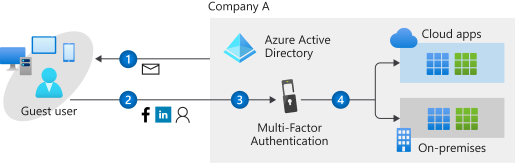
- Azure AD B2B (business to business) collaboration is intended for organizations that want to be able to authenticate users from partner/supplier organization, regardless of the identity provider, and be able to manage the lifecycle of those guest users. These accounts are managed in the same directory as employees, and can be added to the same groups and resources.
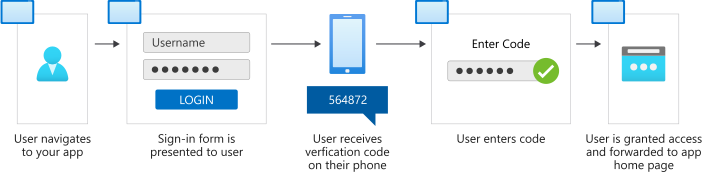
- Azure AD B2C (business to customer) is intended for commerce and other interactions with consumers, citizens, or members of another group that does not require access to internal resources. These accounts are managed in a separate B2C directory, and are completely separate from your internal user accounts. B2C accounts are a customer lifecycle: they are either managed by the customer, or directly by the application.
-
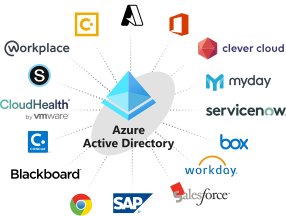
You can configure your software applications to use Azure AD using application management.
-
Applications in Azure AD can use conditional access for application access, Application proxy for on premises legacy apps, and SaaS app support.
-
A directory in Azure AD contains all the users, groups, and apps to perform identity and access management.
-
Facebook, Google, LinkedIn, and Microsoft accounts can all be used with Azure AD B2C.
-
Microsoft 365 Groups and Security Groups are the 2 types of groups in Azure AD.
-
Automated support for HR systems, entitlement management, and built-in RBAC roles are all additional features that users in Azure AD have, but they are not available for on-prem Active Directory.
-
The identity secure score reveals how effective your security is and helps you implement improvements.
-
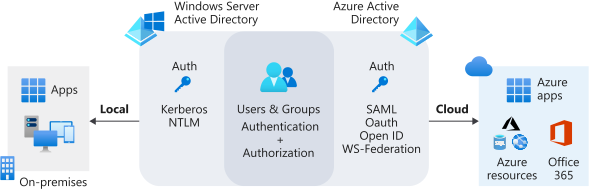
Azure AD is a cloud-based identity solution that helps you manage users and applications. Active Directory manages objects, like devices and users, on your on-premises network.
| Service | Authentication | Structure | What it’s used for |
|---|---|---|---|
| Active Directory | Kerberos, NTLM | Forests, domains, organizational units | Authentication and authorization for on premises printers, applications, file services, and more |
| Azure Active Directory | Includes SAML, OAuth, WS-Federation | Tenants | Internet-based services and applications like Microsoft 365, Azure services, and third-party SaaS applications |
-
Azure Active Directory Premium P2 has Identity Protection that helps you configure risk-based Conditional Access for your applications to protect them from identity-based risks.
-
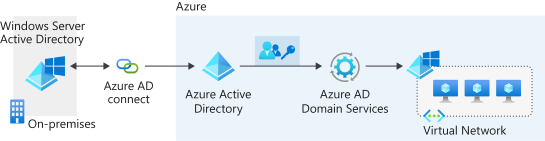
Azure AD DS lets you add virtual machines to a domain without needing domain controllers.
-
Azure AD Identity Protection helps you to automatically detect, investigate, and remediate identity risks for users. Identity Protection also lets you export all the information collected about risks. You can export the information to third-party tools and solutions so that you can further analyze it. Identity Protection uses risk policies to automatically detect and respond to threats.
-
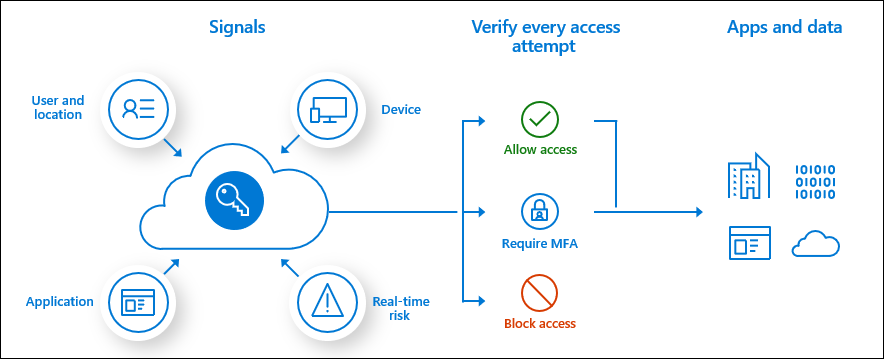
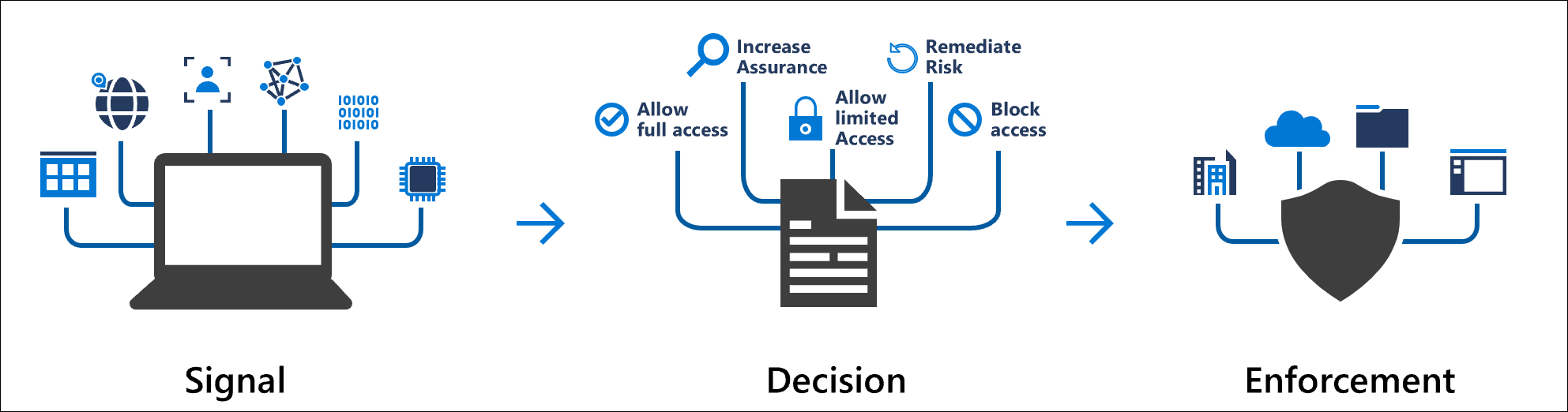
A conditional access is a if/then statement. If a user wants to access a resource, then they must complete an action. First they must meet a condition, secondly a decision is taken, thirdly enforcement is taken. For example, A payroll manager wants to access the payroll application and is required to do multi-factor authentication to access it.
-
Conditional Access is an Azure AD Premium P1 license.
-
Membership, location, device compliance, application being accessed, and risky sign-in behavior are all common conditions or signals used in Conditional Access.
-
Role based access control (RBAC) is the ability to grant access to the users you choose(who), grant access to the correct resources(what), and determine the scope of access(where).
-
There are 4 best practices of RBAC: only grant the access users need, limit the number of subscription owners, use PIM if possible, and assign roles to groups rather than individuals.
-
Privileged Identity Management (PIM) is designed to help you have more control over your most important resources. It enables you to manage, control, and monitor access to important resources in your organization.
-
Privileged Identity Management assignments and scopes allow administrators to assign roles to users. Administrators can set duration, MFA, and approval requirements in PIM settings.
-
PIM gives you ways to limit access to important resources by constraining access to a time-based window approval process in order to help reduce the risks of misuse and excessive access permissions.
-
Entitlement management makes managing employee access to company resources easier. It makes the process of assigning access to users, reviewing access, and the entire access lifecycle automatic, without time-consuming manual provisioning.
-
The Azure AD enterprise applications Add Assignments menu allows you to add assignments to users or groups.
-
Implementing a hybrid identity solution helps your organization simplify the management of your on-prem and cloud identities.
-
Self-service provisioning allows users to go through the Azure AD join process either during Windows Out of Box Experience (OOBE) or using Windows settings.